BullCRM

Capture leads

  • Click-to-WhatsApp AdsTurn Meta clicks to leads
  • WhatsApp QR codeGenerate WhatsApp QR codes
  • WhatsApp link generatorCreate links to connect with customers
  • WhatsApp chat widgetAdd chat button to connect with visitors

Qualify leads

  • WhatsApp ChatbotsAutomate conversations at scale
  • WhatsApp FormsCollect user info using forms

Nurture leads

  • WhatsApp BroadcastScale one-to-many campaigns
  • WhatsApp SequenceAutomate sequence messages

Close deals

  • WhatsApp Shared Team InboxCollaborate seamlessly with team members
  • WhatsApp PaymentsEnable one-click payments on WhatsApp

Everything runs on your own WhatsApp number, connected to your CRM. See WhatsApp Hub

Industry

  • EducationPut admissions on autopilot
  • Real EstateRecommend and promote property listings
  • TravelAutomate hotel and transportation bookings
  • HealthcareSchedule doctor appointments in seconds
  • FinanceEnable transaction and payment alerts
  • Professional ServicesManage client appointments and collect docs
  • LogisticsTrack shipments and update customers instantly
  • AutomotiveDrive test bookings, service reminders, and follow-ups

Team

  • SalesNurture leads, close deals, enable repeat business
  • MarketingCapture leads, personalize campaigns at scale
  • Customer SupportFacilitate meaningful customer conversations

Business type

  • SMBAutomate and scale conversations without extra resources
  • EnterpriseStreamline your sales, marketing and support workflows

See how businesses like yours use WhatsApp Hub to sell and support. See WhatsApp Hub

Customers Pricing

Learn

  • DocsProduct documentation
  • How-to guidesStep-by-step walkthroughs
  • WebinarsLive and on-demand sessions
  • EbooksIn-depth playbooks to download

Templates

  • Bot templatesReady-made chatbot flows
  • Message templatesCopy-ready messages

Stories & news

  • Case studiesHow customers grow with us
  • NewsCompany and product news
  • BlogIdeas for sales and support teams

Guides, templates, webinars and stories for WhatsApp Hub. All WhatsApp resources

Login
Login Book a demo

Your customers are on WhatsApp. Now your sales team is too.

BullCRM WhatsApp Hub is a WhatsApp Business API platform with a shared team inbox, broadcasts, AI agents and a built-in CRM — answer every enquiry, follow up on autopilot and close more orders.

Book a demo Start free trial

OfficialMeta Business Partner

  • Team Inbox
  • Broadcasts
  • AI Agents
  • Automations
  • Catalog

See WhatsApp Hub in action

WhatsApp Hub · Team Inbox
  • Open chats
  • RKRahul K.Is the walnut desk available in 160cm?Sales
  • AMAnita M.Where is my order?Support
  • SJSana J.Can I move my appointment to Friday?Support

Hi! Is the walnut desk available in 160cm? Need it before the 20th.

AI AgentYes, it's in stock! What budget do you have in mind, and which city should we deliver to?

Around $500, Bengaluru.

Lead qualified · passed to Priya (Sales)

Type a reply or pick a template…

CRM record
Rahul K.
StageQualified lead
Budget$500
OwnerPriya
Opportunity created
Follow-up task · tomorrow

Customers worldwide

Trusted by high-growth businesses across the world

      Trusted WhatsApp technology for growing businesses Meta Business Partner

      • Meta Business Partner
      • Team Inbox
      • Approved Templates
      • Broadcast Campaigns
      • Delivery and Read Reports
      • AI Agents
      • Automations
      • WhatsApp Flows
      • Catalog
      • CRM Chat History
      • Your own WhatsApp number
      • Data never sold
      • Meta Business Partner
      • Team Inbox
      • Approved Templates
      • Broadcast Campaigns
      • Delivery and Read Reports
      • AI Agents
      • Automations
      • WhatsApp Flows
      • Catalog
      • CRM Chat History
      • Your own WhatsApp number
      • Data never sold

      The full customer lifecycle

      From the first “hi” to the repeat order — run it all on WhatsApp.

      Never miss a lead, wherever it starts.

      Click-to-WhatsApp ads, your website button and QR codes all drop into one team inbox — and every new number becomes a CRM contact automatically.

      • Your own verified WhatsApp number
      • Contacts and leads created on the first message
      • Instant routing to sales or support
      See it in action

      New enquiriesLive

      • RKRahul K.Walnut desk enquiryNew lead
      • AMAnita M.Order status questionSupport
      • VPVikram P.Bulk order pricingNew lead
      Let AI handle the first round of questions.

      Your AI agent replies in seconds, learns what the customer needs, their budget and timeline, and hands over a warm lead with a neat summary.

      • Answers from your approved knowledge
      • Asks about need, budget and timing
      • Hands off with full context
      See it in action

      AI qualificationLive

      • NDNeedWalnut desk, 160cmCaptured
      • $Budget$500Captured
      • TMTimingBefore the 20thCaptured

      Follow-ups that send themselves.

      Set it once: approved templates go out at the right moment, and owners get a nudge whenever a chat goes quiet.

      • Trigger, wait and condition steps
      • Template reminders on schedule
      • Segment-based drip messages
      See it in action

      Follow-up workflowLive

      • 1Lead qualifiedTriggerStart
      • 2Wait 1 dayNo reply yetWaiting
      • 3Send quote reminderApproved templateQueued

      Browse, choose and order — in one chat.

      Share items from your Catalog and collect delivery details with WhatsApp Flows. The order lands in your CRM without any copy-paste.

      • Catalog products inside the chat
      • Flows for structured details
      • Deal stage updated automatically
      See it in action

      Order in chatLive

      • CTWalnut desk sharedFrom CatalogViewed
      • FLDelivery FlowDate: 18 OctSubmitted
      • OPOpportunityMoved to WonUpdated

      Keep customers coming back after checkout.

      Order updates, appointment reminders and loyalty campaigns keep you top of mind — with delivery and read reports on every send.

      • Order and appointment updates
      • Sent, delivered, read and replied tracking
      • Complete chat history in CRM
      See it in action

      Delivery reportLive

      • SSentOrder update templateTracked
      • DDeliveredReached the customerTracked
      • RReadOpened by the customerTracked

      Product tour

      See WhatsApp Hub in action — broadcasts, automations and a shared inbox.

      Real screens from the BullCRM app. Send campaigns at scale, build no-code chatbot flows and reply as a team, all from one place.

      Broadcast Automation Flows Team Inbox

      01 · Broadcast

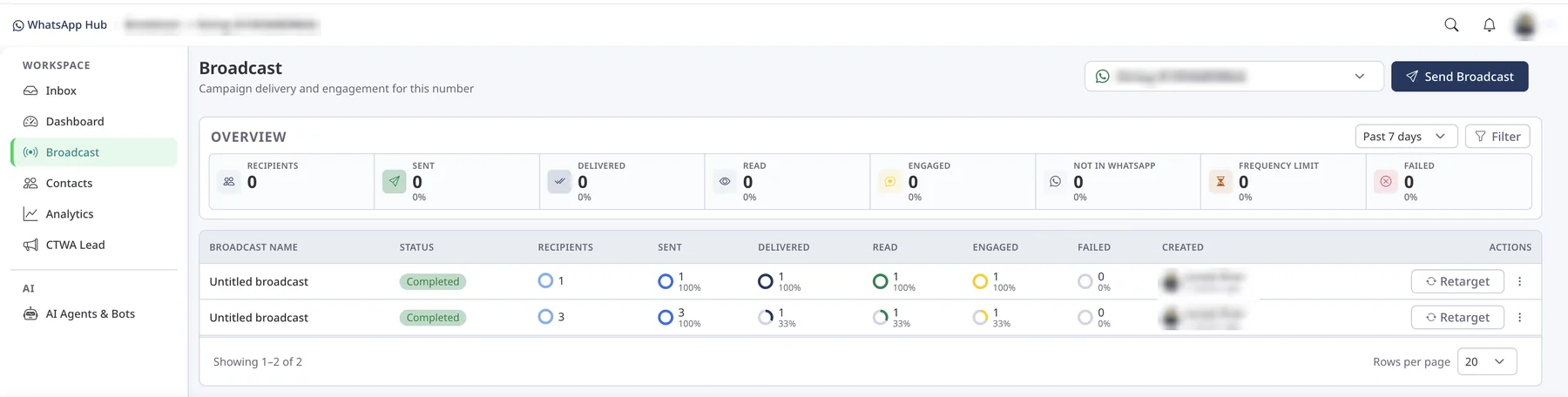
      WhatsApp broadcasts with live delivery analytics.

      Send approved campaigns to thousands of customers and see exactly what happened to every message, from sent to read to replied, in one overview.

      Send your first broadcast

      WhatsApp Hub · Broadcast

      Broadcast dashboard showing recipients, sent, delivered, read, engaged and failed metrics with a per-campaign table and retarget buttons
      Live delivery metrics Retarget in one click
      • Pick the number — run broadcasts per WhatsApp number from one dropdown and switch instantly.
      • 8 live delivery metrics — recipients, sent, delivered, read, engaged, not on WhatsApp, frequency-limited and failed.
      • Per-campaign breakdown — see status, counts and percentages for every broadcast, plus who created it and when.
      • One-click retargeting — resend to people who didn't read or reply without rebuilding the audience.
      • Date range and filters — compare the past 7 days, 30 days or any custom period.
      • Approved templates only — every send uses a Meta-approved template, so your number stays in good standing.

      02 · Automation Flows

      Build WhatsApp chatbot flows without writing code.

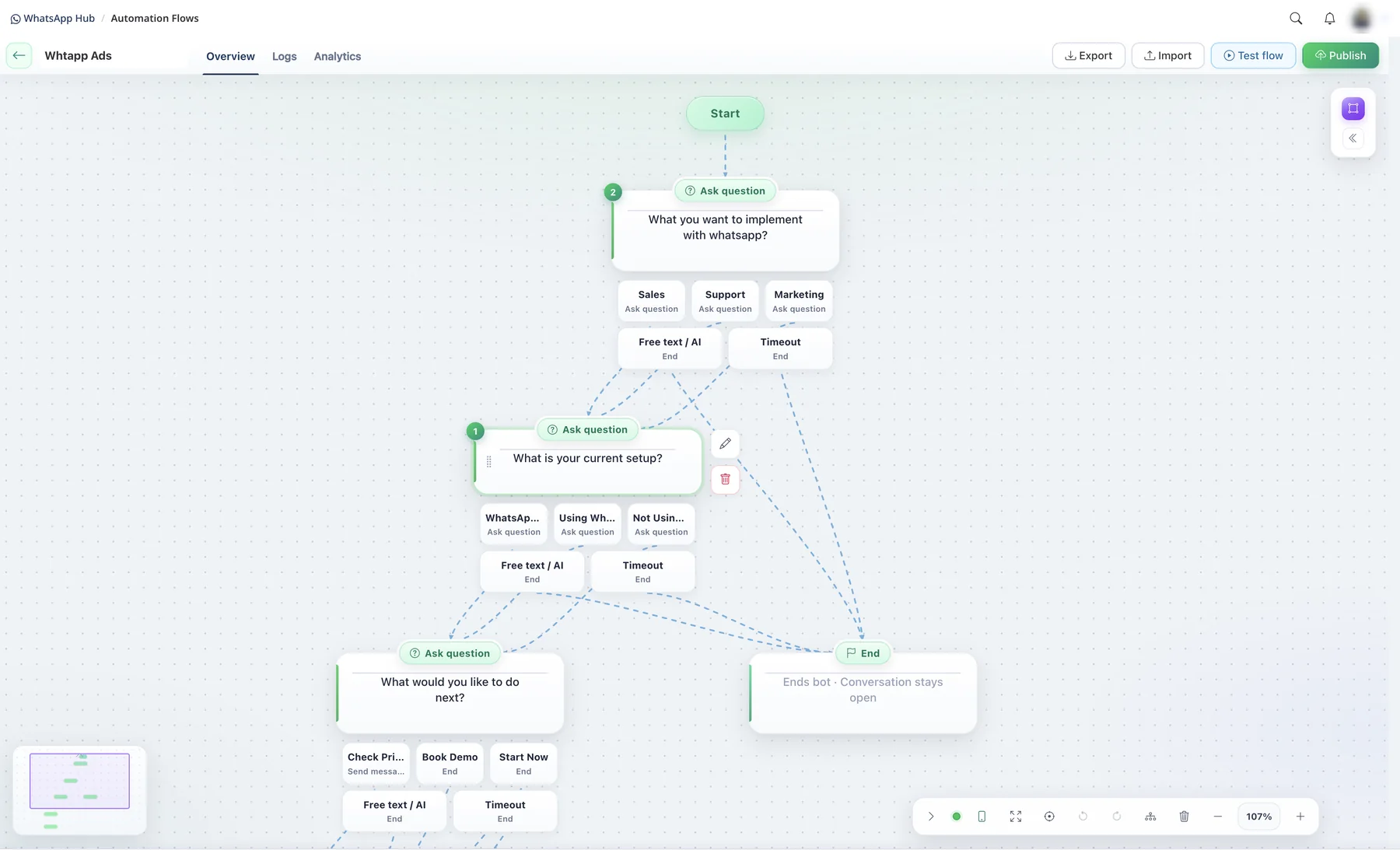
      Map out the conversation visually: ask a question, branch on the answer and hand qualified leads to your team. Every lead from your ads gets a reply in seconds, day or night.

      • No-code visual builder — drag, connect and edit steps on an infinite canvas with a minimap and zoom.
      • Ask questions with reply buttons — Sales, Support or Marketing — each answer opens its own branch.
      • Free text and AI fallback — when a customer types instead of tapping, AI understands and keeps the flow moving.
      • Timeouts and clean endings — decide what happens when someone goes quiet, and close the bot while keeping the chat open.
      • Test before you publish — run the flow yourself, then publish in one click. Import and export flows to reuse them.
      • Logs and analytics — see every run and where customers drop off, so you can improve each step.
      See a live flow demo

      WhatsApp Hub · Automation Flows

      Automation flow builder with Start and Ask question nodes, reply-button branches, free text AI fallback, timeout and End steps, plus Test flow and Publish buttons
      No-code flow builder AI handles free text

      03 · Team Inbox

      One shared WhatsApp inbox for your whole team.

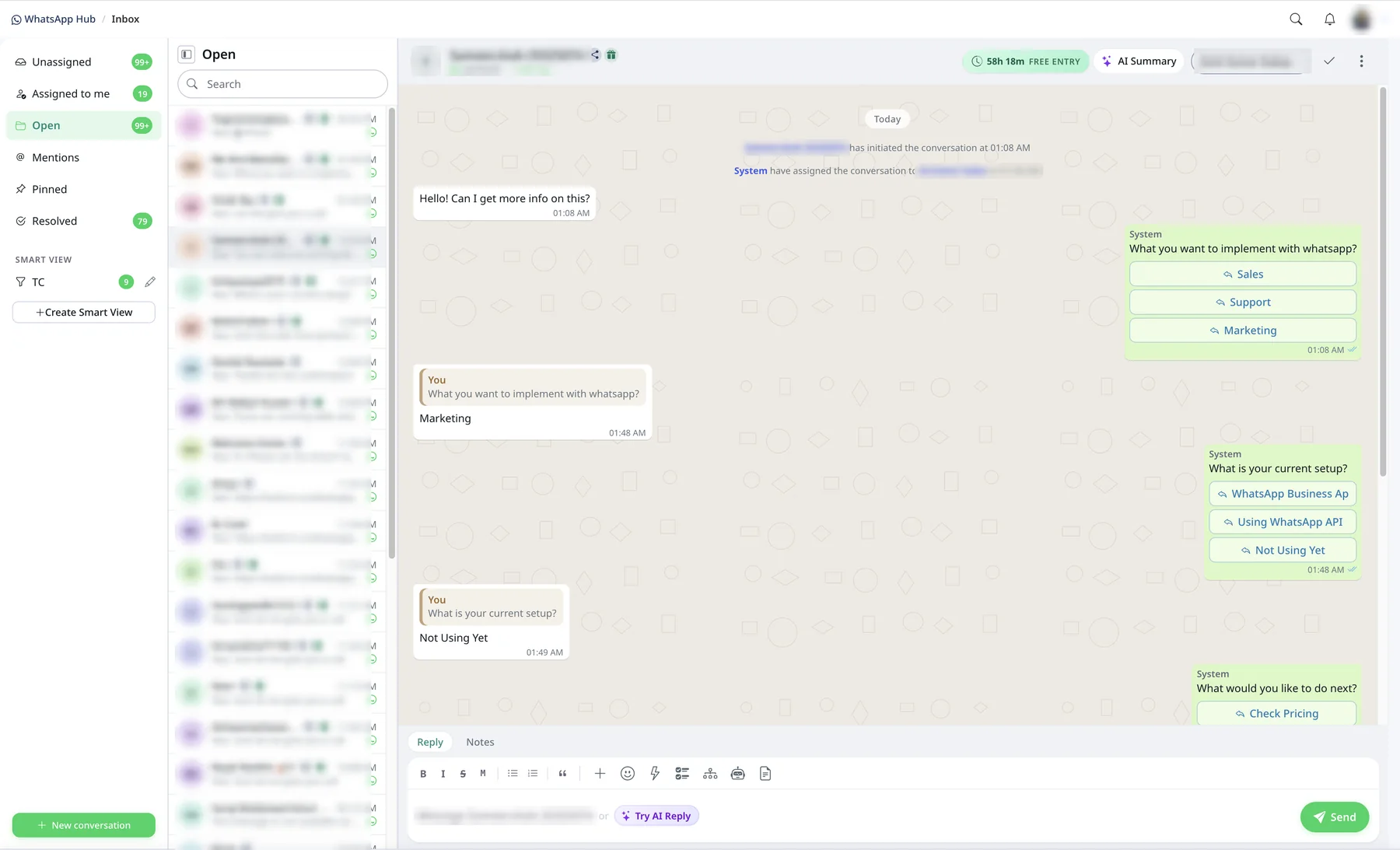
      Every chat lands in one place, already sorted and assigned. Agents see the bot conversation, the customer's answers and the time left to reply, then take over with AI by their side.

      • Smart folders — Unassigned, Assigned to me, Open, Mentions, Pinned and Resolved, with live counts.
      • Custom smart views — save your own filters so each team sees exactly the chats it owns.
      • Conversation window timer — know how long you can reply for free, including free-entry windows from Click-to-WhatsApp ads.
      • AI Summary and AI Reply — catch up on a long thread in seconds and draft replies with one click.
      • Assign, note and resolve — hand chats to teammates, leave private notes and mark them done.
      • Full bot history in the thread — every button tap and system event stays visible, so agents pick up with full context.
      Try the inbox free

      WhatsApp Hub · Team Inbox

      Team inbox with Unassigned, Assigned to me, Open, Mentions, Pinned and Resolved folders, a live chat with reply buttons, AI Summary and Try AI Reply
      AI Summary Free-entry window timer

      One platform

      Everything your team needs to sell and support on WhatsApp.

      No more juggling phones and spreadsheets. Every chat, template and campaign lives next to the customer record it belongs to.

      • Plug in your own number

        Connect your Meta Business Portfolio and WhatsApp Business Account — your number, your brand, your data.

      • One inbox, many agents

        Route chats to the right person, add internal notes and reply together from a single business number.

      • Templates, approved and ready

        Draft, sync and preview Meta-approved templates, then send them in a click and see who read them.

      • Broadcasts that reach the right people

        Pick a segment, choose a time and send approved campaigns, reminders and updates at scale.

      • Know what landed

        Live sent, delivered, read, failed and replied reports for every message and campaign.

      • A CRM that remembers every chat

        Messages sit on one timeline with contacts, leads, tasks and deals — so nobody asks the same question twice.

      More than a chat window

      AI agents, automations, Flows and Catalog — working inside every conversation.

      AI Agents

      Your always-on first responder.

      It replies instantly from your approved FAQs, asks the right questions about need, budget and timing, and passes a ready-to-close lead — with a summary — to your team.

      Need
      Walnut desk, 160cm
      Budget
      $500
      Timing
      Before the 20th

      → Passed to Sales with summary

      Automations

      Workflows that keep running after hours.

      Build simple if-this-then-that journeys with triggers, waits and conditions. Chats get routed and CRM records update on their own.

      1. When · Lead is qualified
      2. Wait · 1 day
      3. Send · Quote reminder template
      4. Then · Assign owner and update CRM

      WhatsApp Flows

      Forms that feel like a conversation.

      Collect preferences, dates and booking details in a native WhatsApp screen. Answers save straight to the chat and the CRM.

      Product type
      Office desk
      Delivery date
      18 Oct
      Submit

      Catalog

      Your storefront, right inside the chat.

      Sync products, share them mid-conversation and carry the order details into CRM so follow-up is effortless.

      • Walnut deskShare in chat
      • Task chairShare in chat
      • Desk lampShare in chat

      Industries

      Made for businesses that sell through conversations.

      Turn property enquiries into site visits.

      Capture leads from listing ads, let the AI agent ask about location, budget and BHK, and book site visits with reminders — all on WhatsApp.

      Talk to an expert
      • Example messages
      • Thanks for your interest in Green Meadows! Which configuration are you looking for — 2 or 3 BHK?
      • Your site visit is confirmed for Saturday, 11 AM. Reply 1 to reschedule.
      • New brochure and price sheet for Tower B, just for you.

      Fewer no-shows, happier patients.

      Let patients book, reschedule and get reminders over WhatsApp, while your front desk handles every query from one shared inbox.

      Talk to an expert
      • Example messages
      • Hi Sana, this is a reminder of your appointment tomorrow at 4:30 PM.
      • Tap below to pick a new slot for your follow-up visit.
      • Your lab reports are ready. Reply REPORT to receive them.

      Guide every applicant from enquiry to enrolment.

      Answer course questions instantly, collect applicant details with Flows and send counselling and deadline reminders automatically.

      Talk to an expert
      • Example messages
      • Which programme are you interested in — UG, PG or certification?
      • Your counselling session is booked for Monday at 6 PM.
      • Only 3 days left to submit your application. Need help?

      Sell, update and re-engage in the same chat.

      Share your Catalog, take orders, send shipping updates and win back past buyers with targeted campaigns.

      Talk to an expert
      • Example messages
      • Here are this week’s new arrivals. Tap to browse the catalogue.
      • Good news! Your order has been shipped.
      • You left something in your cart. Want us to hold it for you?

      Faster responses on high-value conversations.

      Qualify loan and insurance leads, collect documents securely in-chat and keep every interaction logged against the customer record.

      Talk to an expert
      • Example messages
      • To check your eligibility, may we know your monthly income range?
      • Please share a photo of your PAN card to continue.
      • Your policy renewal is due next week. Reply YES to renew.

      For every team

      Sales, marketing and support — sharing one number and one customer view.

      Sales

      Reply first, follow up always, close faster.

      • Leads auto-assigned to owners
      • Follow-up reminders and templates
      • Deals updated from the chat

      Marketing

      Campaigns people actually open.

      • Segment-based broadcasts
      • Scheduled sends with approved templates
      • Delivery, read and reply reports

      Support

      Fast answers without the chaos.

      • Shared inbox with assignment
      • AI answers common questions
      • Full history on every customer

      Hear from the power users of WhatsApp Hub by BullCRM

      Read all customer stories

      Go live in four simple steps.

      Start free trial
      1. Link your number

        Connect your Meta Business Portfolio and WhatsApp Business Account in a few clicks.

      2. Set up your team

        Invite agents, sync your templates and teach the AI agent your FAQs.

      3. Switch on automations

        Turn on workflows, Flows and Catalog, then send your first campaign.

      4. Measure and grow

        Watch delivered, read and reply rates and keep sharpening your messages.

      Your customer data stays yours

      We use WhatsApp Platform Data only to run the service you asked for. We never sell it, never use it for third-party ads and never share it with unrelated parties. Every client sees only its own customers and account. Request data deletion

      Questions, answered

      What does the BullCRM WhatsApp integration do?

      It connects your WhatsApp Business Account to BullCRM so your team gets a shared inbox, approved templates, broadcasts, delivery reports, automations, AI agents, Flows and Catalog — all tied to CRM records.

      Can I use my own WhatsApp Business Account?

      Yes. You bring your own Meta Business Portfolio and WhatsApp Business Account and link your phone numbers to BullCRM. Each client manages only their own customers and account.

      Which features are included?

      Team inbox, approved template messaging, segment broadcasts, sent/delivered/read tracking, CRM chat history, AI agents, automations, WhatsApp Flows and Catalog.

      Can I send templates and broadcasts?

      Yes. Create, sync, preview and send Meta-approved templates, and schedule campaigns to customer segments with full delivery reports.

      How does the AI agent hand over to my team?

      It answers from your approved FAQs and knowledge, collects need, budget and timing, then passes the chat and a short summary to the right person.

      Do you sell Platform Data?

      No. Platform Data is used only to provide the service you request. It is never sold, never used for third-party advertising and never shared with unrelated parties.

      How can I ask for my data to be deleted?

      Submit a request through our data deletion page. You can ask us to delete account data, WhatsApp connection data, conversations, templates and related records. Open the data deletion page

      Meta Business Partner

      Ready to make WhatsApp your best-performing sales channel?

      Connect your number to BullCRM today and start every conversation with full context.

      Book a demo Start free trial
      BullCRM

      Modular CRM products for growing teams — start with one, add the rest when you’re ready.

      OfficialMeta Business Partner

      Products

      Company

      Complete CRM Contact sales

      Resources

      Resource library Blog Product updates Message rates

      Account

      Login Start free trial

      BullCRM

      © 2026 BullCRM. All rights reserved. Privacy Policy Terms of Service Data Deletion